Lume, the Pagelume AI assistant
Meet Lume, the AI that sets it up for you

Your own business
management system.

Describe what you need to manage, or upload your spreadsheet. Lume builds the complete app with lists, forms, a dashboard, team logins and reminders in minutes. No tech skills. Free to start.

Ideas to get started
  • Free plan, no card needed
  • Ready in minutes, not weeks
  • Your records and code stay yours
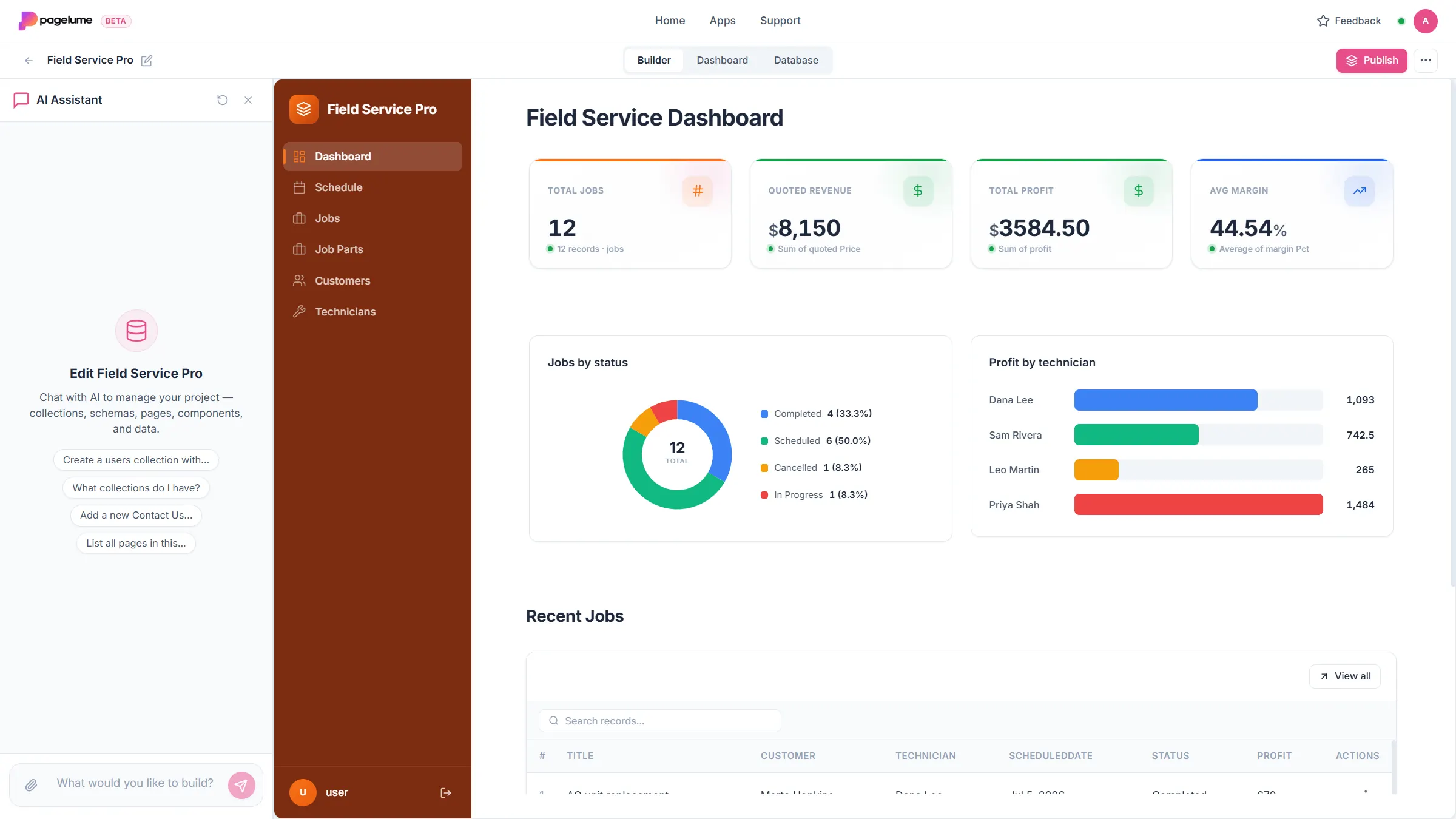
Pagelume builder with Lume beside a jobs dashboard, jobs table and KPIs for a plumbing business
Profit this month $12,480 ▲ 12%
Ask Lume “Which invoices are still unpaid this month?”
Reminder sent, invoice #1042 due in 3 days

What you get

Three leaks every small business has. Fixed on day one.

Lume builds the lists, the reminders and the dashboard around the way your business actually runs.

Unpaid invoices

01Stop chasing money you already earned.

Every invoice has a due date. Lume sends a polite reminder before it is due and again after, until you mark it paid. The invoice itself is a PDF made from the record, so nothing is retyped.

  • Reminder emails on a schedule you set
  • Invoice and quote PDFs from a record
  • One list of who owes what, always current
A small business owner at her desk checking invoices on a laptop

Lost leads and double bookings

02Never lose a lead or book the same slot twice.

Every call and message becomes a lead with a follow-up date and an owner. Jobs go on a calendar that refuses overlapping slots. Each morning you see what is due today, not what you remember.

  • Leads with follow-up dates and owners
  • A calendar that blocks double bookings
  • Today and overdue lists on your phone
A florist taking an order on the phone while checking a tablet
This week1 overlap blocked
Mon
Tue Boiler Taken
Wed Visit
Thu Quote
Fri Install
  • Call back: Mrs Khan, new leadToday
  • Follow up: quote #88Overdue

No clear numbers

03Know your numbers without a spreadsheet.

Profit per job, rent collected, stock on hand. The dashboard updates as your team works. Ask Lume "which invoices are unpaid this month" and get the answer, not a report to build.

  • Dashboards that update themselves
  • Stock that adjusts when you sell or receive
  • Ask Lume questions in plain words
A print shop owner checking stock on a tablet among rolls of material
Profit this month$12,480
Unpaid$4,820
Low stock3
Which invoices are unpaid this month?

How it works

From one sentence to an app your team opens every day.

  1. 1

    Tell Lume about your work

    Type what you keep track of, such as "jobs, customers, quotes and unpaid invoices", or upload the spreadsheet you use today.

  2. 2

    Lume builds your app

    Lists, forms, a calendar, a dashboard, team logins and sample data, connected and ready in a few minutes. You see every change Lume makes, and page, field and layout changes can be undone.

  3. 3

    Run your business in it

    Add real records, invite your team and set reminders. Change anything by asking. Share it at a live link, or download the code if you ever want it.

You

Track jobs, customers, quotes and unpaid invoices for my plumbing business

Lume is building
  • Lists created: jobs, customers, quotes, invoices
  • Forms and calendar connected
  • Dashboard: open jobs, unpaid total, profit this month
  • Reminder: 3 days before an invoice is due
  • Logins ready for your team, sample data added
Your app is ready Open it

Meet Lume

Lume builds your app. Then it stays to help run it.

Ask for a report, look up a record, draft a change. Lume answers from your live data in plain words and a person confirms before anything is saved. Included on every plan, within your monthly credits.

  • Quick answers from live records
  • Changes you ask for, with a list of what changed and undo for page and layout changes
  • Nothing is saved until you confirm it
Lumeinside your app

Which invoices are still unpaid this month?

3 invoices are unpaid, $4,820 in total. The oldest is 12 days overdue. Want me to send reminders?

Add a priority field to jobs and show overdue ones first

Done. Every job has a priority now, and overdue jobs sit at the top of the list.

Log today’s rent payment for Unit 4B

Here is the payment record for Unit 4B, $1,150 dated today. Confirm and I will save it.

Watch it happen

Two minutes, start to finish.

A real small business goes from one line to a working app with lists, a schedule and a dashboard, then changes it by chatting. No cuts.

Pricing

Free to start. Upgrade when your team lives in it.

The Free plan includes 100 AI credits every month, enough to build your first app and keep improving it. Hand edits never use credits.

Available now

Free

$0 per month

Everything you need to run one small business in an app.

Build my app free

No credit card required

  • 100 AI credits every month, refreshed on the 1st
  • Lume builds and changes your app from plain words
  • Lists, forms, calendars and dashboards
  • Reminder emails and invoice PDFs
  • Logins for your team or clients
  • Share at a live link, download the code any time
Waitlist open

Pro

Coming soon

For teams that run their whole day in the app.

One email when Pro launches, nothing else

Everything in Free, plus

  • More AI credits every month for Lume, in the builder and inside your app
  • Connectors to the tools you already use
  • Advanced automations with multiple steps and conditions
  • Premium features, with first access as each one launches
  • Priority support from a real person
  • Room for teams that update records all day

AI credits are spent when Lume builds or changes your app, or answers inside it. Editing by hand never uses credits. Pro pricing will be announced before launch.

Done for you, free

No time to set it up? We build it for you.

Tell us how your business runs. Within 48 hours a real person builds your system in Pagelume and walks you through it. Free, no card, nothing to build.

  • 48hfrom form to finished system
  • 1:1built by a person, not a template
  • 20 minwalkthrough so you can run it
Claim my free setup Five businesses a week. We reply within one business day.
Two shop owners checking their new system together on a tablet
Built in Pagelume by a real person

FAQ

Questions, answered.

What is Pagelume?

Pagelume gives small business owners their own management system for the work that runs their week. You tell Lume, the built-in AI helper, what you keep track of, such as jobs, clients, quotes, invoices, rentals or stock, and it builds the system for you: linked lists, forms, a calendar, a dashboard and secure logins. Reminder emails send themselves, invoices come out as PDFs, and you change anything by asking.

Who is Pagelume for?

Owners and managers of small businesses who are not technical: plumbers, electricians, contractors, landlords, agencies, salons, clinics and small shops. If your work runs on lists, schedules and money and currently lives in spreadsheets, WhatsApp or paper, Pagelume is built for you. It also works for personal trackers such as tasks or expenses.

What can Pagelume not do?

Pagelume is not for games, chat or video apps, marketing websites, online stores or mobile apps for the app store. It builds apps made of lists, forms, calendars, dashboards and logins. Asking for something outside that will spend your credits on an app that does not do what you hoped, so start with the work you manage every day.

Is Pagelume free, and what are AI credits?

Yes. The Free plan includes 100 AI credits each month, refreshed on the 1st, with no credit card needed. Credits are used when Lume builds your app, makes a change you ask for, or answers inside your app. Editing by hand with drag and drop never uses credits. Pro adds a much larger allowance and priority support; its price will be announced before launch.

Can I start from a spreadsheet?

Yes. When you create a new app you can attach an Excel spreadsheet (.xlsx) or Word document (.docx). Pagelume reads your columns and turns them into linked lists, forms and a first dashboard.

How do reminder emails work?

Each app can send emails when a record is created, updated or deleted, or on a schedule relative to any date field, such as 3 days before an invoice is due or 7 days after while it is still unpaid. Emails go to a fixed address, the address stored in the record, or your app users. Bounced and unsubscribed addresses are protected automatically.

How is Pagelume different from Airtable, Bubble, Glide or Base44?

Those are tools for people who want to build software, and they start you from building blocks or a blank page. Pagelume is for people who just want their daily work handled. Lume builds a finished first version on day one, with lists, forms, a calendar, a dashboard, logins and reminders already connected and filled with sample data, and you change it by asking in plain words. It is focused on running a small business, not on making websites or consumer apps.

Can my team log in, and do I own the app?

Yes to both. Every app has built-in logins with admin and user roles, and you share it at a live link. The app and its records are yours: export a backup or download the full code at any time, so you are never locked in.

Is my data safe?

Yes. Your records are private to you and the people you add. A published app gets its own web address, but everyone has to log in before they see anything, and only you and the people you add can log in. Each person gets a role (admin, editor or viewer) that decides what they can change, and you can remove anyone at any time. See the Privacy Policy for what is collected and why.


Start now

Stop running your business from memory. Describe it once. Lume builds the rest.

Jobs, clients, invoices, reminders and a live dashboard, ready for your team in minutes.

  • Free plan, no card
  • Ready in minutes
  • Your data and code stay yours
Launched on StartupBase